We chose monday.com and built the Jira parts ourselves
Jira got too expensive for us, but monday.com lacked the planning we were used to. So we built Infra: our own system in Drupal for tickets, sprints, hours and invoices. Here is how it works, and where the hard part was.
Jira got too expensive
Jira is strong at sprints and backlogs, but you pay per user. And at our agency it is not just developers who work in tickets: marketing, content and project management plan their work there too. For an agency our size, the bill got too high for what we got out of it.
We chose monday.com. It is clear, also for people who are not developers, and it fits our budget. But monday.com is not Jira. Sprints with real dates, a backlog with a fixed order and an overview of who has how much work were not there the way we wanted them.
An extra package, or a second tool next to monday.com? Then you pay twice and copy data by hand. We took a third route.
What Infra is
Infra is our internal system, built in Drupal 11. It started in the summer of 2025 as time tracking. At the end of 2025 the monday.com integration and the invoices followed, and in 2026 client agreements, reporting and planning.
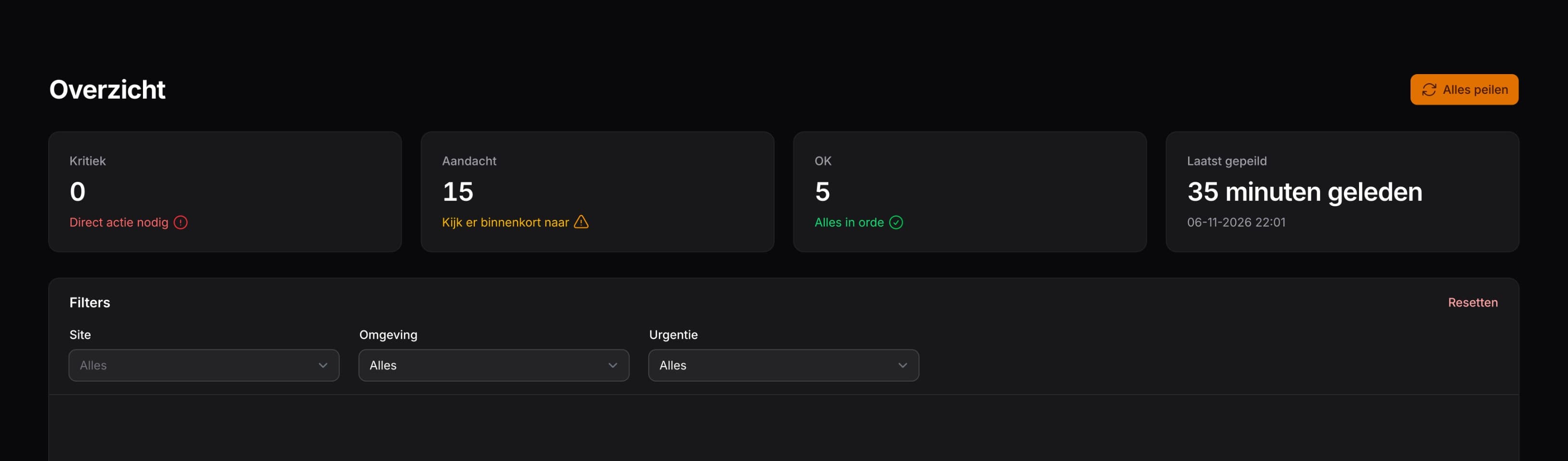
A colleague opens a ticket and logs hours on it, and those hours end up on the right invoice by themselves. A project manager plans a sprint per client and sees on one screen what is done, what is stuck and who has too much on their plate.
monday.com for the ticket, Infra for the planning
The most important choice was made before the first line of code: which system owns which piece of data? monday.com stays the source of the ticket: its name, its status, who works on it, its deadline and its estimate. Infra is the source of the planning: which sprint a ticket is in, whether it is ready for a sprint, and in what order. That planning never goes to monday.com.
When someone changes a ticket in Infra, the change goes to monday.com first. Only when monday.com accepts it does Infra update its own copy. That way the two systems do not drift apart.
One ticket, two systems
- A ticket starts in monday.com, with a name, a status, a deadline and an estimate.
- Every ten minutes Infra fetches the tickets that changed and keeps a copy. Every night Infra reads everything once more.
- The project manager puts tickets in a sprint and sets the order of the backlog. That lives in Infra only.
- When someone drags a card to another column, the new status goes to monday.com right away.
- A colleague logs hours on the ticket. Infra writes the logged hours back to monday.com.
- Every month the hours become an invoice, according to the agreements with the client.
What we rebuilt from Jira
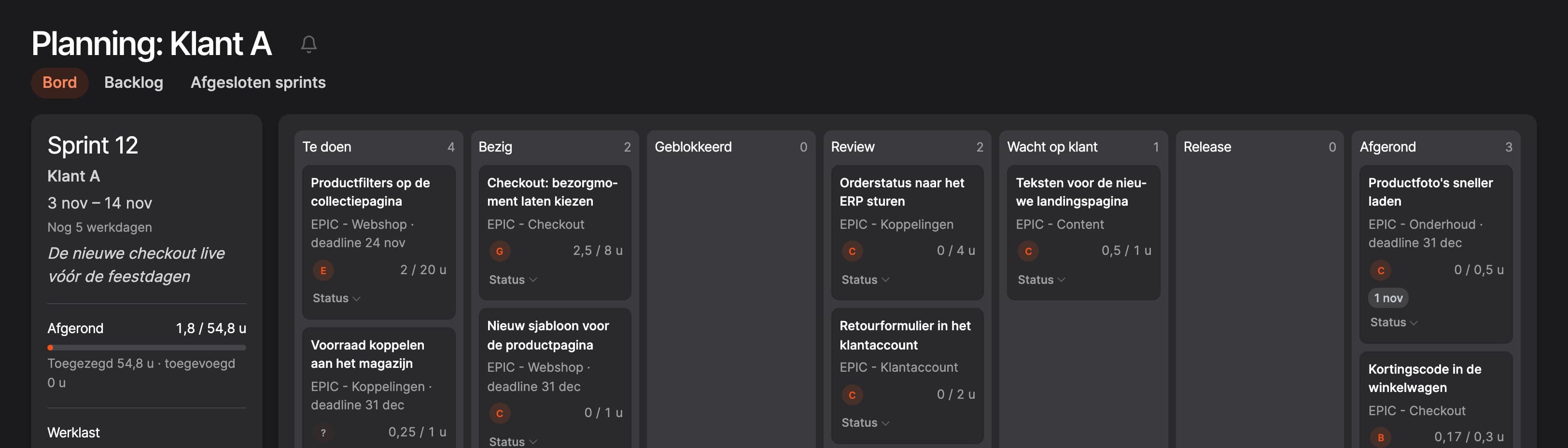
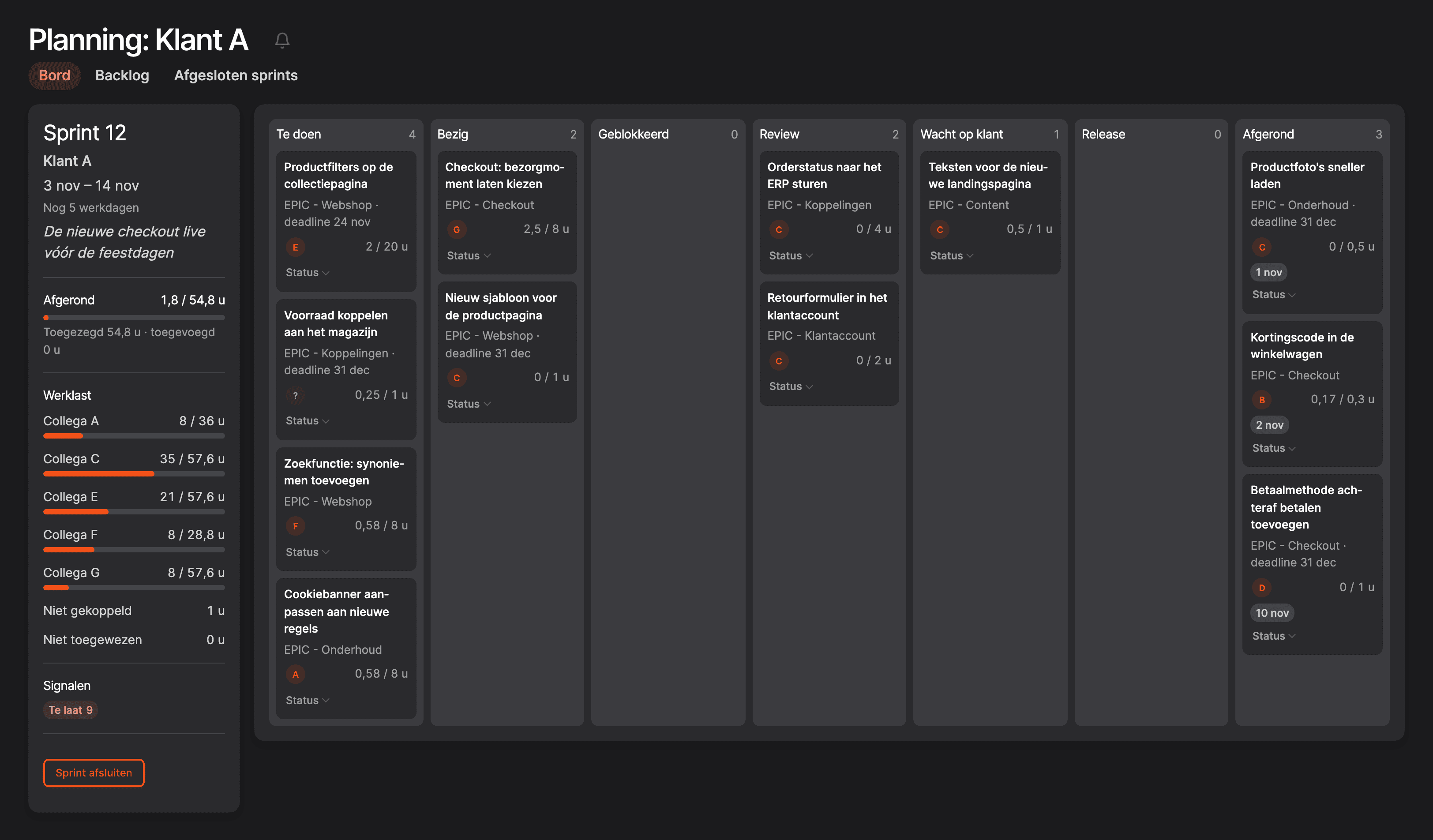
- A board per client. Columns from To do to Done. Drag a card to another column and the status in monday.com changes with it. If monday.com refuses the change, the card moves back by itself.
- Sprints with real dates. A start, an end, a goal of one sentence and what was committed. What gets added halfway is shown separately. When you close a sprint, what is not done moves to the next sprint or back to the backlog.
- A backlog with an order. New tickets come in as New. The project manager marks them Ready for sprint, On hold or Not now, and drags the ready ones into order. As in Jira, every row has a menu to move it.
- Workload and signals. For each colleague, the planned hours sit next to the hours that colleague has available in the sprint. A ticket that is late, or about to be, gets a signal.
- A ticket page like Jira's. The name at the top, the status and who works on it next to it, the comments from monday.com below, with @mentions and attachments. From that page you also log your hours directly.
The backlog, the Jira way
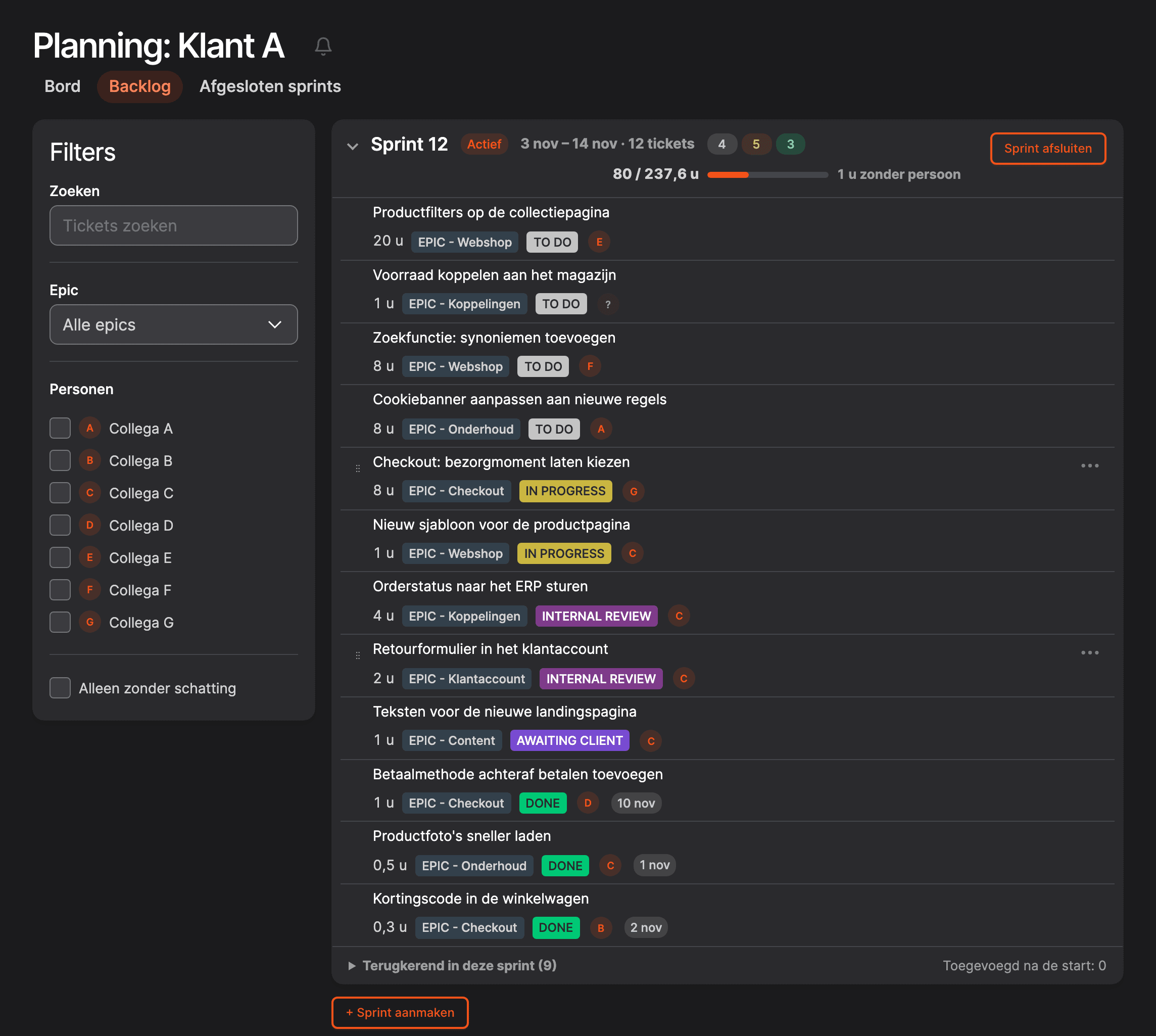
At the top is the running sprint with everything in it, below it the backlog in groups. On the left you filter by epic, by colleague or by tickets without an estimate.
Drupal as your own CRM
Planning is one side. The other side is everything an agency needs to know about its clients: which agreements are running, how many hours are left, what needs to be invoiced this month. CRM and accounting packages exist for that, but they rarely fit the way you work exactly. In Drupal you build that layer yourself, and much of it is already there:
- A data model without code. A client is a content type with fields, such as the rates per service and the linked boards in monday.com. Adding a field takes a few clicks.
- Users, roles and permissions. Who may see which client, who may invoice and who may only read the figures: you set that up with roles Drupal already knows.
- Lists and forms. You build overviews with filters and sorting in Views, without writing queries yourself.
- Configuration in git. Every change to fields and permissions goes to production through a review, just like the code.
- A fixed security routine. Drupal has its own security team, and our Updater checks every hour whether Infra is up to date.
On top of that we built what no package did for us: agreements in four forms (a monthly subscription with hours, hours for a project, a fixed product per month or year, and a one-off product), an hours balance per client, invoices as PDF, overtime and holiday hours per colleague, figures per client, colleague and service, and a work report we send to clients.
Where it gets hard
Fields and forms are the easy part. A first version of a CRM in Drupal is up quickly. The hard part is in things you only run into once the system is used every day. For us, there were five.
1. An integration has limits
monday.com gives an account 10,000 API requests a day. Once they are used up, the whole integration stops until midnight: no ticket page, and no hours going back to monday.com.
We almost hit it because of a repair. A background job had been throttled by monday.com for a while, and a throttled request counts for only a tenth. When we fixed the job, all those requests suddenly succeeded. Usage went from about 2,600 to around 8,000 a day overnight, without a single new feature.
The solution was a copy of all tickets in tables of our own. Every ten minutes Infra asks only for what changed, bundles ten boards into one request and stops after thirty requests per round. The overviews read that copy instead of monday.com. We deliberately did not use webhooks: they need a public address and a webhook per board, and monday.com does not guarantee that every message arrives.
2. A total you store stops being right after a while
A client's hours balance used to be a number stored on the client. Every invoice subtracted the invoiced hours. When a month was invoiced again, the same hours were subtracted again. After a few times, the balance was far below reality.
Now we do not store the balance anywhere. Infra works it out again from the logged hours every time: the subscription hours are used first, then those of an extra pack of hours. Working it out again always gives the same answer, and there is no "recalculate" button for someone to forget.
3. Time and money have edge cases
A calendar component in the browser quietly converted time zones to UTC. As a result, hours sometimes landed in the books a day early. Since then only the server deals with time zones; the browser works with a day and the number of minutes since midnight.
Money works the same way. Rates are fixed onto the invoice when it is created. If you later change a rate, an agreement or the VAT percentage, an existing invoice stays as it was.
4. Drupal sometimes fails without an error
Drupal is forgiving, and that is not always a good thing. A few examples we ran into:
- A change to a form with the wrong form name does nothing. No error, no warning. A download button never existed that way, while the documentation said it worked.
- A role given a permission that no module defines loses it at the next deploy, without anyone noticing. Because of that, colleagues saw buttons on their notifications that were refused when clicked.
- The monday.com API likes to keep quiet too. A filter on a person without the right prefix returns zero results. Ask for more than 25 boards without a limit, and you get 25.
That is why Infra runs on tests: more than a hundred test files for the PHP code, and separate tests for the JavaScript of the planning. We write a test so that it fails without the fix. Only then do you know it guards something.
5. Who may see what
In a system of your own, hours, rates and cost prices sit side by side. Not everyone needs to see everything. In Infra every access check goes through one place, which decides which clients someone may see. An analyst reads the figures but cannot change agreements. And the work report for a client never contains amounts or the names of colleagues; a test checks that.
Our stance
Rent what is standard. Build what makes the way you work unique.Brandbrand
Is this something for your business?
A system of your own is not for everyone. If a standard CRM or planning tool fits the way you work, use it. It gets interesting when:
- you pay for the same people in several tools and copy data by hand;
- the way you work does not fit what a package can do, and you work around it every week;
- you track hours, agreements and invoices in separate spreadsheets;
- you want to keep a tool like monday.com, but need something next to it that it cannot do.
Then we build something like this for you too, in Drupal or Laravel, connected to the tools you already use. We start small, with the process that costs the most time today, and build on from there. That is how Infra came about as well. Email us and tell us what you are running into.
Frequently asked questions
Can you use Drupal as a CRM?
Yes. Drupal comes with users, roles, permissions, fields, forms and overviews. You store clients, agreements and hours as types of your own with fields of your own, and only build the rules that belong to your business yourself.
Do you have to stop using monday.com or Jira?
No. Infra works next to monday.com and reads the tickets from it. You keep the tool your team is happy with, and build what that tool lacks yourself.
How long does it take to build something like this?
That depends on what you need. Infra grew in steps, over a little more than a year: first the hours, then the monday.com integration, then invoices, agreements and planning. Each step was useful on its own.
Why Drupal and not Laravel?
Both work. Laravel gives more freedom if you want to decide everything yourself. Drupal gives more out of the box: administration, permissions, forms and translations. For an internal system with many lists and forms, that saves a lot of work. We build in both.